 relay.
THE FEATURE TOUR / 0.8.2
Every feature.
On the record.
The complete tour of Relay 0.8.2 — agents, workspace, context, output, controls and the phone. Skim the headings, or jump straight to the part you need.
Relay is a local-first desktop workspace for AI coding agents: six panes, the CLIs you already use, a built-in chat, a browser your agent can drive, a markdown vault and project wiki, memory, bots and subagents, automations, cost tracking, and an Android companion.
What Relay is
Relay is a shell, not a replacement. It runs the agent CLIs you already use, keeps their sessions, and surrounds them with the surfaces a real project needs: a terminal, a browser, git, a vault, knowledge, memory, scheduled work and a phone. Everything lives in one window, on your machine.
The core idea: your agents already have brains; Relay gives them a room. Up to six chats share one screen, each pane can run a different engine, and the layout survives restarts. Cloud models, local GGUF models and CLI harnesses sit beside each other; switching an engine does not throw the conversation away.
- Local-first by default. Workspace, chats, notes, memory and artifacts live in a local database and folders you choose. There is no Relay-side account and no telemetry.
- Bring your own models. Anthropic, OpenAI, OpenRouter, a custom OpenAI-compatible endpoint, or a local llama-server. Keys live in the OS keychain.
- Bring your own agents. Claude Code, Kimi Code, OpenCode, Pi, Omp and CommandCode, plus ACP agents and the built-in chat.
- One screen, many surfaces. Six panes, a browser, a terminal, git, a vault, a wiki, automations, bots and a phone.
Install & update
Relay ships as a Windows NSIS installer and an Android APK. The desktop installer is around 363 MB; the installed footprint is around 2 GB because Python and LibreOffice are bundled. Windows will ask for permission to install; no account is required.
- Desktop: Windows 10/11 (64-bit), NSIS installer from GitHub Releases.
- Phone: Android APK, paired with the desktop. The iOS target exists in the Expo project but is not distributed yet.
- Updates: a signed feed is checked on launch and every four hours. The banner shows release notes and installs with one click.
- History: every build is on the Releases page; the source repo stays private while installers are public.
First run
The first launch is a five-step onboarding flow: meet Relay, choose your path, pick an agent, choose a workspace, and set your defaults. The agent probe is live; a missing CLI can be installed from Settings, and the built-in chat can be configured with an API key or a local model.
- Workspace: pick a folder with the native picker; file tools are scoped to the roots you grant.
- Defaults: permission posture, provider/model and the first chat are set here.
- Re-run anytime: onboarding is reachable from Settings and never overwrites existing sessions.
Agents & models
Relay is an orchestration layer. A CLI session keeps its own history and native permission prompts; a built-in turn goes straight to a provider or local sidecar. You can move a conversation between engines mid-thread and keep the context.
Supported harnesses
- Claude Code — Anthropic's CLI, native permission modes and tools.
- Kimi Code — Moonshot's agent, including native yolo/auto/plan modes.
- OpenCode — the open-source terminal agent, own model list and tools.
- Pi — a prompt-only harness for a fast, focused loop.
- Omp — a terminal agent with live per-model costs in the picker.
- CommandCode — standard, plan and accept-edits modes in a real CLI.
- ACP agents — Agent Client Protocol agents discovered and run in the same pane shell.
Built-in chat
- Provider kinds: Anthropic, OpenAI Chat Completions, OpenAI Responses, OpenRouter and custom OpenAI-compatible endpoints. A provider can have several named endpoints.
- Model picker: live discovery, provenance badges, per-model context windows, effort/reasoning gating and tool-calling support for local models.
- Auto-routing: an Auto entry picks an available cloud model per turn with fail-over and cost bias; local GGUF and CLI harnesses stay explicit.
- Prompt caching: Anthropic cache breakpoints on tools, system and newest message, OpenRouter-compatible marks, and a strip-and-retry fallback.
Local models
- Model Market: search Hugging Face as you type, browse GGUF families and quants, download with progress on the button.
- llama-server: managed sidecars with real context windows, cache reuse, CUDA build updates and a request log.
- Local extras: Kokoro read-aloud, whisper dictation, sd.cpp images, an embedding picker and an optional reranker.
- Gateway: a loopback endpoint other apps can route through, with retention and body caps.
Workspace & panes
The workspace is the product. Every pane is a real session, not a tab: split left/right or top/bottom, drag a session into any edge, resize the gutters, and keep the layout across restarts. The cap is six chat panes; the sidebar is the inbox, the projects panel is the filing cabinet, and the bottom bar is the room directory.
- Six panes: one session per pane, drag-to-edge drop zones, equalized splits, and a refusal only when the window genuinely cannot fit another usable pane.
- Sidechat:
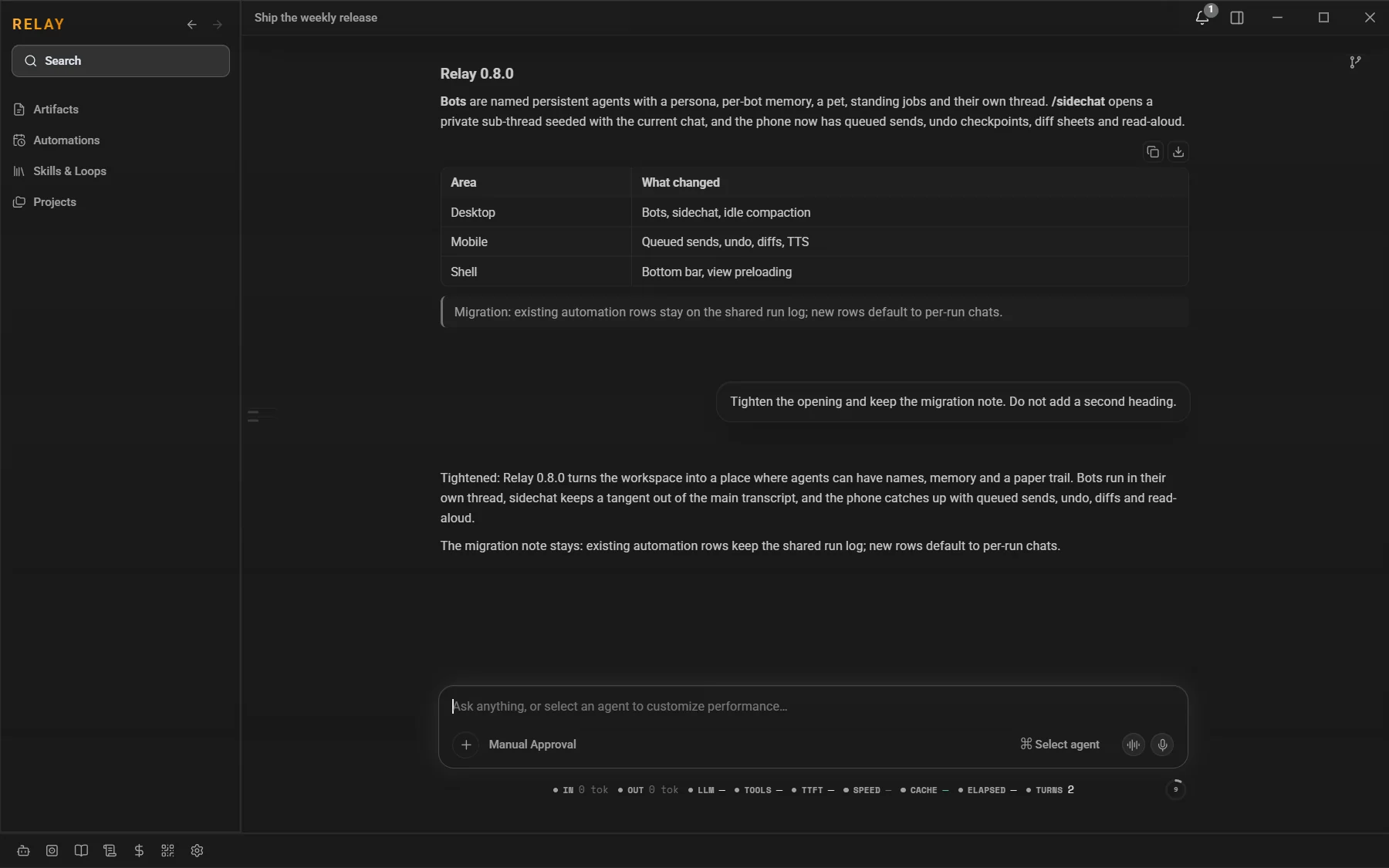
/sidechatopens a private second thread seeded with the current context. The main transcript is never written to, and a source chat owns at most one sidechat. - Fork: copy a chat's config and live history into new panes, optionally truncating at a message. Forks get their own worktree.
- Session Mesh: agents list, read, search, message and spawn other sessions. Answers return to the asking turn; depth and concurrency caps keep the mesh bounded.
- Layout memory: pane ratios, pinned sessions, note tabs, artifact tabs and the last main chat survive restarts. The Bots view hands the real chat back when you leave it.
- Navigation: project-bound chats nest under their project, the flat inbox shows unbound chats, and starred or unread sessions float.
Chat & composer
The composer is a control surface, not a text box. It carries the current agent/model, permission posture, attachments, voice input, metrics, context meter and goal state, while the transcript keeps thinking, tool calls and edits visually separate from the answer.
- Streaming & control: streamed answers, Stop and Escape, queued sends with Send now or remove, and a persisted partial turn.
- Predictions: after a reply, a ghost-text suggestion for your next message. Tab fills it, Escape dismisses, and accepting never sends.
- Recall & navigation: up/down prompt recall with draft stashing, per-session history, and a command palette for sessions, actions and settings.
- Goals & plans: an active-goal notch with its own timer, plan proposals that pause for approval, question cards, and a confirm-edits posture with a real diff and occurrence-level accept.
- Attachments & voice: image, doc and text attachments; local whisper dictation with live partials; Kokoro read-aloud of answers, artifacts and selections; hands-free loop with barge-in.
- Checkpoints: per-turn file changes, A/M/D rows, review/open, colorized diffs, and undo from a checkpoint. Image generation anchors to the generating turn.
- Idle compaction: long-stale threads summarize themselves in the background on a configurable idle window and token floor, oldest-first when rate-limited.
- Reliability: per-session error banners, a watchdog that defers to the backend, a repeat-error breaker, a silent-hang watchdog and honest quota-exhaustion cards instead of infinite spinners.
Vault
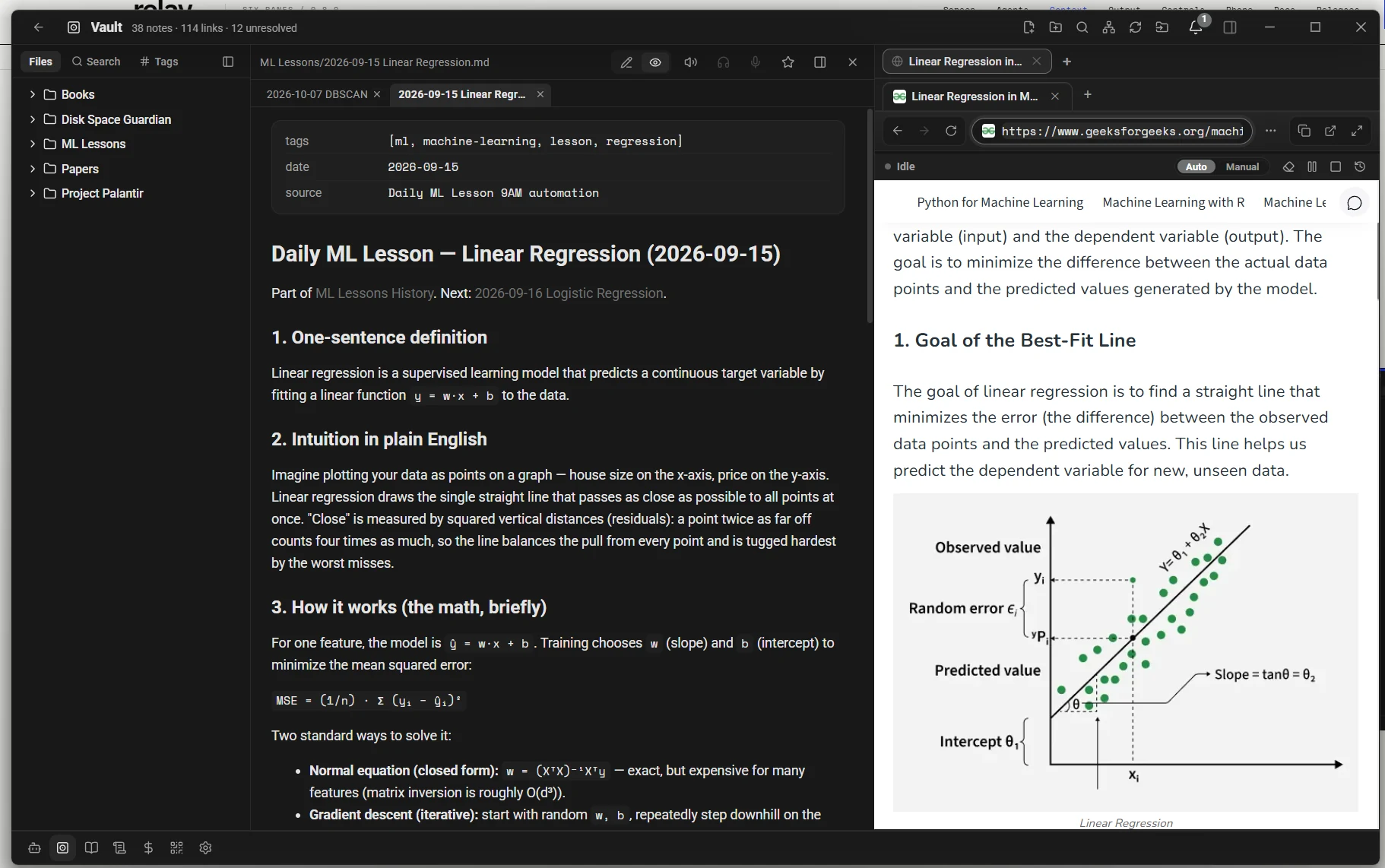
Vault is a folder of plain markdown on your disk, wrapped in an editor that feels like a notes app and an agent that can actually work in it. Notes are files, not rows; moving one rewrites every inbound wikilink across the vault, deletes land in a recoverable trash, and saves are atomic.
- Editing: tabs, a rich markdown editor, callouts, properties, templates, tags, a local graph and an in-app PDF viewer with highlights.
- Search: full-text search with
tag:,path:,file:, quoted phrases and-excludeoperators, with ranked snippets. - Agent CRUD:
vault_list,vault_read,vault_search,vault_write,vault_moveandvault_deleteshare the UI's atomic core. - Voice: read a note or selection aloud, or dictate at the caret with autosave and undo.
- Side-by-side: the tool panel can hold a browser or terminal beside the note.
Project wiki
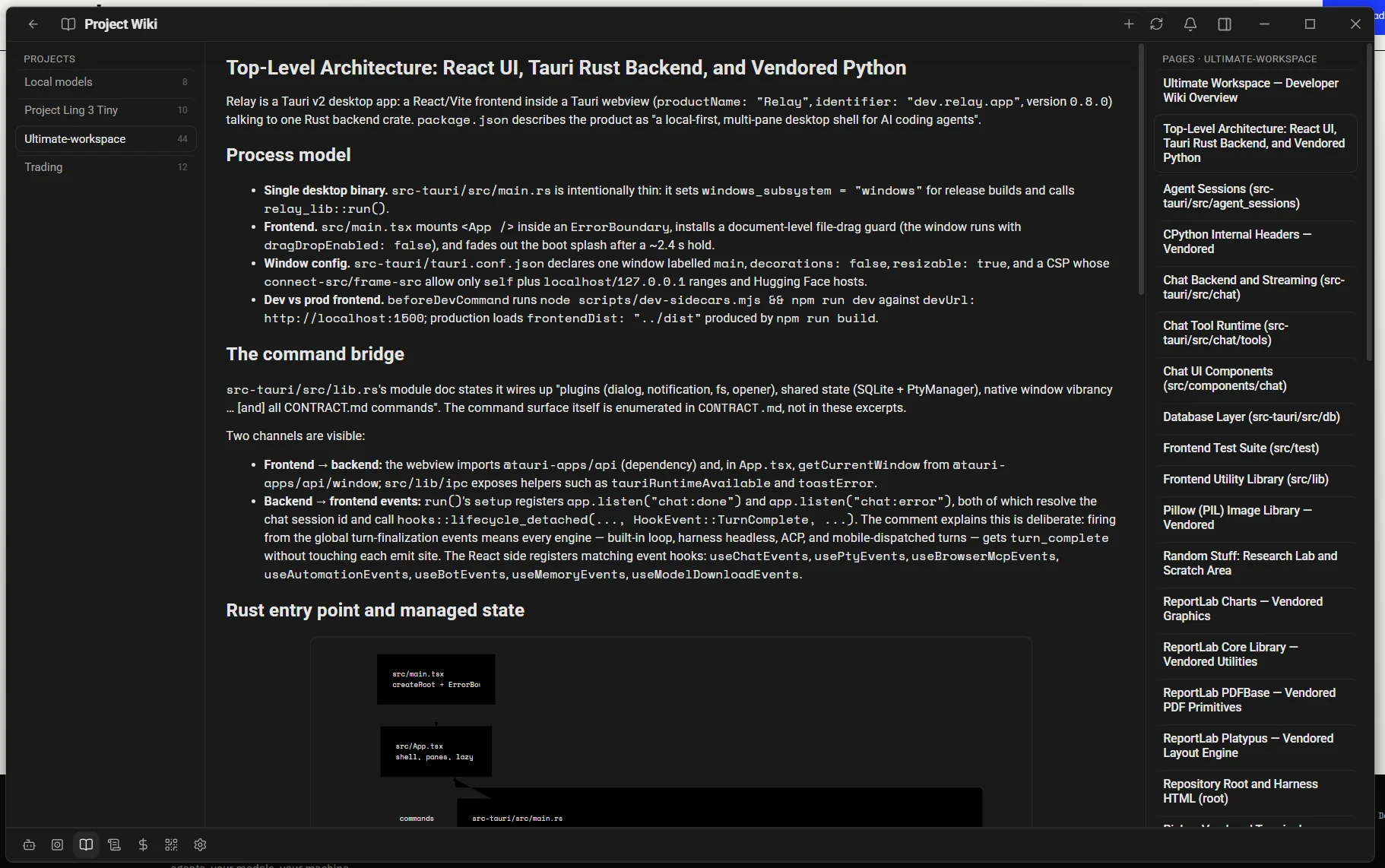
Point Relay at a codebase and it builds a per-project knowledge base: repository analysis, an LLM outline, and one page per section. Every page ends in a grounded-claims ledger — claim, repo-relative path, line range and blob SHA.
- Freshness is computed: the update pass diffs HEADs, joins changed paths against stored evidence and re-derives only the affected pages. A clean repo costs zero model calls.
- Dependable builds: a malformed response gets one repair round, in-flight CLI cancel is real, and permanent quota/auth failures surface as actionable errors.
- Search & reading: pages are FTS-indexed, the reader scrolls to the top on page change, and delete is a single confirm.
Memory & knowledge
Memory is a persistent, inspectable document, not a hidden vector dump. A background worker extracts candidate facts, a consolidation judge decides ADD / UPDATE / DELETE / NOOP, and contradictions are superseded bi-temporally with an audit trail.
- Retrieval: hybrid local search (nomic cosine + FTS5 bm25), min-max fusion, MMR, project scoping, an importance/confidence model and staleness decay.
- Injection: an always-on profile block, a per-turn remembered-context block and a
memory_recalltool, provenance-tagged and capped. - Browser: search, filter, edit, retire, add, purge and export from Settings → Memory, with evidence links.
- Knowledge / RAG: bind local folders, chunk with a heading trail, index with an embedding model, fuse keyword and vector legs with RRF, optionally rerank, and query through doc QA.
- AGENTS.md: ancestor discovery and an 8k cap, injected into harness bundles and the chat prompt, with read/write registry tools.
- Prompt firewall: scan memory/RAG injections for instruction injection; flag, strip or off. Skills are a separate gallery with install-from-URL and allowed-tools metadata.
Bots & subagents
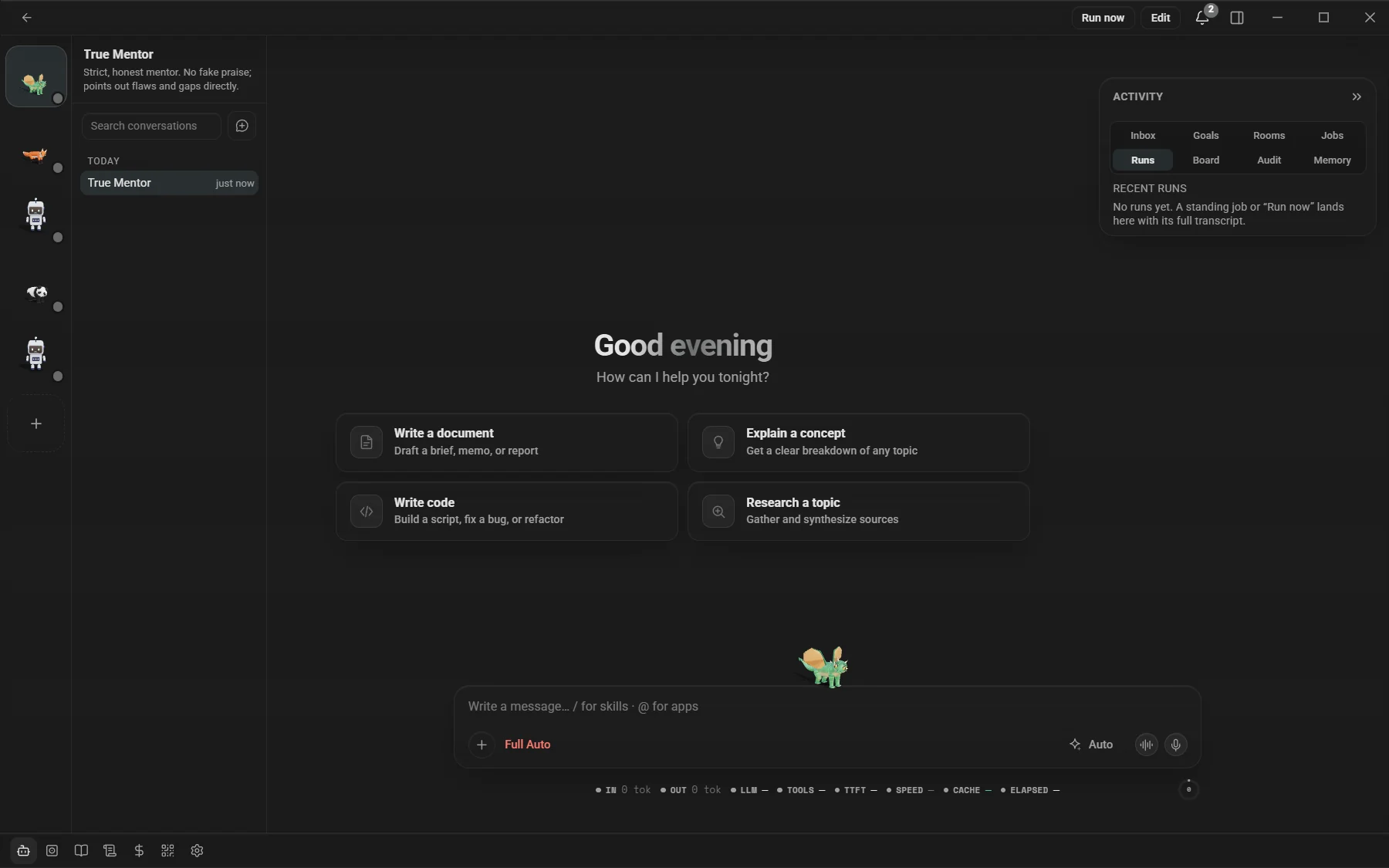
A bot is a persisted identity with a persona, its own memory, a pet and a thread. A subagent is a saved role with a prompt, tool allowlist, permission scope, model and spawn budget. Both are reusable; neither is a hidden prompt in the chat.
Bots
- Thread + runs: one lazy thread plus hidden run sessions for standing jobs and automations, with a runs strip and a full transcript per run.
- Unattended safety: a background run never executes a write-class tool directly. It queues a deterministic approval with the tool, arguments and summary; approve replays the exact call, deny writes it off.
- Rooms, goals, audit, rules: bots collaborate in rooms, own goals with steps, and leave an audit chain. The editor exposes persona, memory, pet, permissions and tools.
- Memory: a per-bot profile
bot:<id>, optional read-through to the default profile, and a purge on delete. - Phone: approve or deny bot runs and see the roster from Android.
- Pets: six 3D species docked on the composer and search bar, with state animations and a sprite/emoji fallback.
Subagents
- Registry: built-in roles are seeded as data; define a prompt, tools, permission scope, model, worktree policy and concurrency budget.
- Spawn paths: the Task tool, a Run button, Session Mesh and automations. Harness-native agents import with one click.
- Honest tiers: Relay's loop enforces the tool allowlist; a CLI harness runs its own tools, so that tier is labelled advisory, not silently trusted.
- Runs: history, per-agent hooks, credential pre-flight and a worktree per run when requested.
Documents & artifacts
A conversation can end in a file you can open, present and keep. Relay's generation tools are local-first where possible and every deliverable lands in the artifact library.
- Documents: a plan-first design layer (DocPlan / DeckPlan, tokens, 7 themes, 13 deck layouts) compiles to DOCX, PPTX and PDF, with page-level QA and in-app preview; XLSX is handled by the spreadsheet tool.
- Diagrams: Mermaid diagrams that restyle with your theme and export as transparent PNG.
- Images: local sd.cpp generation, including Qwen-Image Turbo, with family-aware encoder/VAE resolution and CUDA build updates.
- Visualizations: typed
visualizecards (chart, line, donut, table, task board, timeline, stat) with validated data and optional art direction. - Widgets:
render_widgetruns a sandboxed, opaque-origin HTML mini-app with the MCP Apps bridge, live theme variables and an opt-inwindow.relayWidgetAPI. - Artifacts: a 30-day library with preview, export, per-artifact cost, expired backups, self-improving versions/evals/canary promotion and loops.
Browser, terminal & git
The tool surface is part of the workspace: a native browser, real PTY terminals and a git panel, all scoped to the chat you are in.
Browser & computer use
- Native pane: tabs, a three-tray URL bar, full screen, per-project profiles and a trust layer. Agents read, click, type, fill forms, select, press keys, batch actions, read console/network and take screenshots.
- Relay self-control: agents drive Relay's own React DOM through the same ref contract, by element or viewport pixel, with explicit
stale_refrecovery and agent-excluded chrome. - Containment: URL-scheme allowlists, popup/download containment, an auto-deny for permission surprises and a capped tool loop.
run_codeis gated exactly likerun_shell.
Terminal & git
- Terminal: real PTY panes with background runs, scrollback, per-task cleanup and a full-bleed view that follows the wallpaper.
- Git: status, diffs, branches, worktrees, commit graph, checkpoint restore and AI commit messages.
- Pulls: conversation and syntax-highlighted file tabs, markdown, state glyphs, issues, a comment composer, and GitHub error/token lifecycle handling.
Connectors, MCP & skills
- Connectors: OAuth to Notion, GitHub, Google Drive, Gmail, Calendar, YouTube and Kiwi; tools ride the same permission posture and tokens live in the OS keychain.
- MCP: gallery or custom servers, attach on demand, allowlisted runtimes, timeouts, and a relay-tools bridge that reaches every harness.
- Skills: install from URL, GitHub or zip; version and allowed-tools metadata; loops and prompt templates; family-locked tools unlock on demand.
Automations
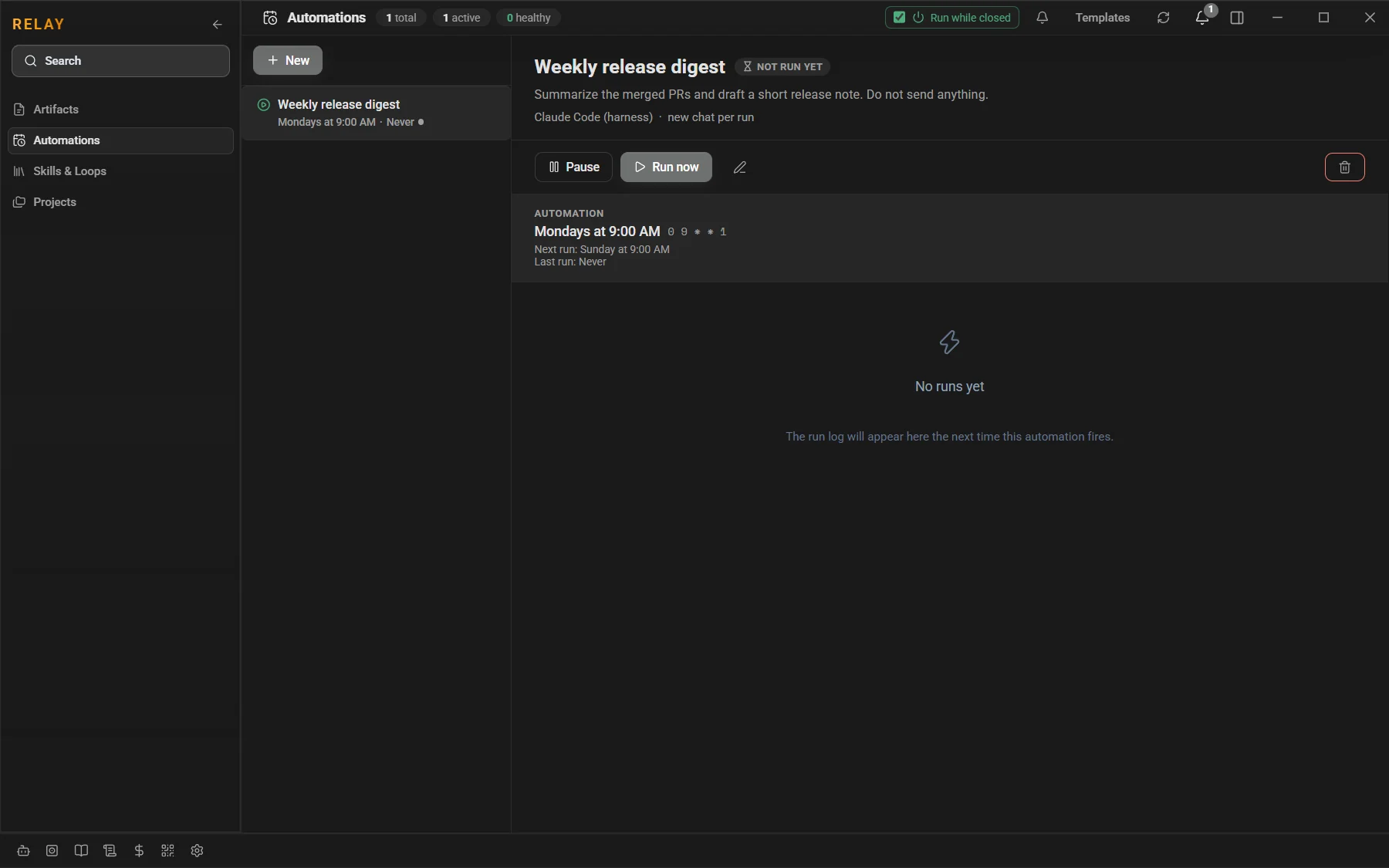
An automation is a prompt with a trigger. It can fire on a cron schedule, an inbound webhook, a watched file, a git HEAD change or new Gmail activity, and it can run while Relay is closed through the automation sidecar.
- Per-run chats: new automations get a fresh chat per run by default, so one run's context never leaks into the next; shared run logs remain available.
- Bot jobs: bind a job to a bot to use its persona, tool policy and approval gate. Disabled bots skip their jobs.
- Templates: a PR-review bot and a repo digest are prefilled starting points, reachable from the empty state and the Pulls panel.
- Run history: every run has its own transcript, status and timestamps; the headless runner keeps the schedule while the app is closed.
- Approvals: unattended write-class calls queue for approval on desktop and phone rather than running silently.
Providers & cost
Relay treats models as a portfolio, not a single setting. You can route each chat explicitly, let Auto choose a cloud model, or keep a local model on the machine. The cost dashboard prices the same records after the fact, so the number on screen is derived from the same events that ran the turn.
- Providers: Anthropic, OpenAI Chat Completions, OpenAI Responses, OpenRouter and custom OpenAI-compatible endpoints; several named endpoints per kind.
- Usage & limits: rolling 1h/24h/7d/30d usage, provider plan windows (Claude Code rate-limit frames, Anthropic/OpenAI headers, CommandCode, OpenCode Go, OpenRouter credits), user caps and a composer warning notch.
- Cost dashboard: token and cost rollups, a cache-savings hero, auto-refreshed LiteLLM pricing, a model breakdown and per-artifact attribution.
- Quota handling: an exhausted free tier ends the turn with the CLI's own message instead of an endless spinner; automations stop retrying permanent failures.
Controls & safety
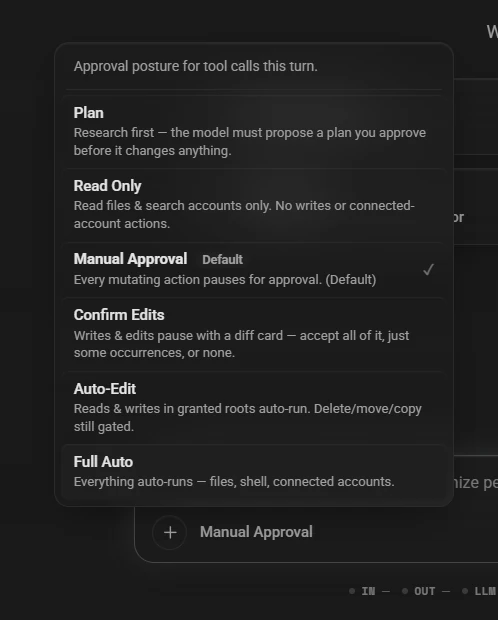
Autonomy is a dial, not a binary. The permission posture applies to tool calls in the current turn; bots and unattended runs have their own approval gate on top.
- Plan: research first; the model proposes a plan you approve before it changes anything.
- Read Only: read files and search; no writes or connected-account actions.
- Manual Approval: every mutating action pauses for an approval card.
- Confirm Edits: writes and edits pause with a diff; accept all, some occurrences or none.
- Auto-Edit: reads and writes in granted roots run automatically; delete/move/copy stay gated.
- Full Auto: everything runs, including files, shell and connected accounts. Use deliberately.
- Approval rules: always-allow rules per tool and glob, an exec gate for spawned commands, and an in-app confirm instead of the WebView dialog.
- Hooks: pre/post tool scripts can deny, ask, observe or rewrite arguments, with matchers, lifecycle events and Claude-hook import.
- Prompt firewall: strips or flags instruction-injection attempts before memory/RAG content reaches the model.
- Secrets: provider keys live in the OS keychain; the phone never receives them. The source repo is private; installers ship via public releases.
Default posture: new sessions start in Full Auto unless onboarding pinned Manual Approval, Read Only or Automatic. Manual Approval is the safest explicit choice for interactive work.
Mobile
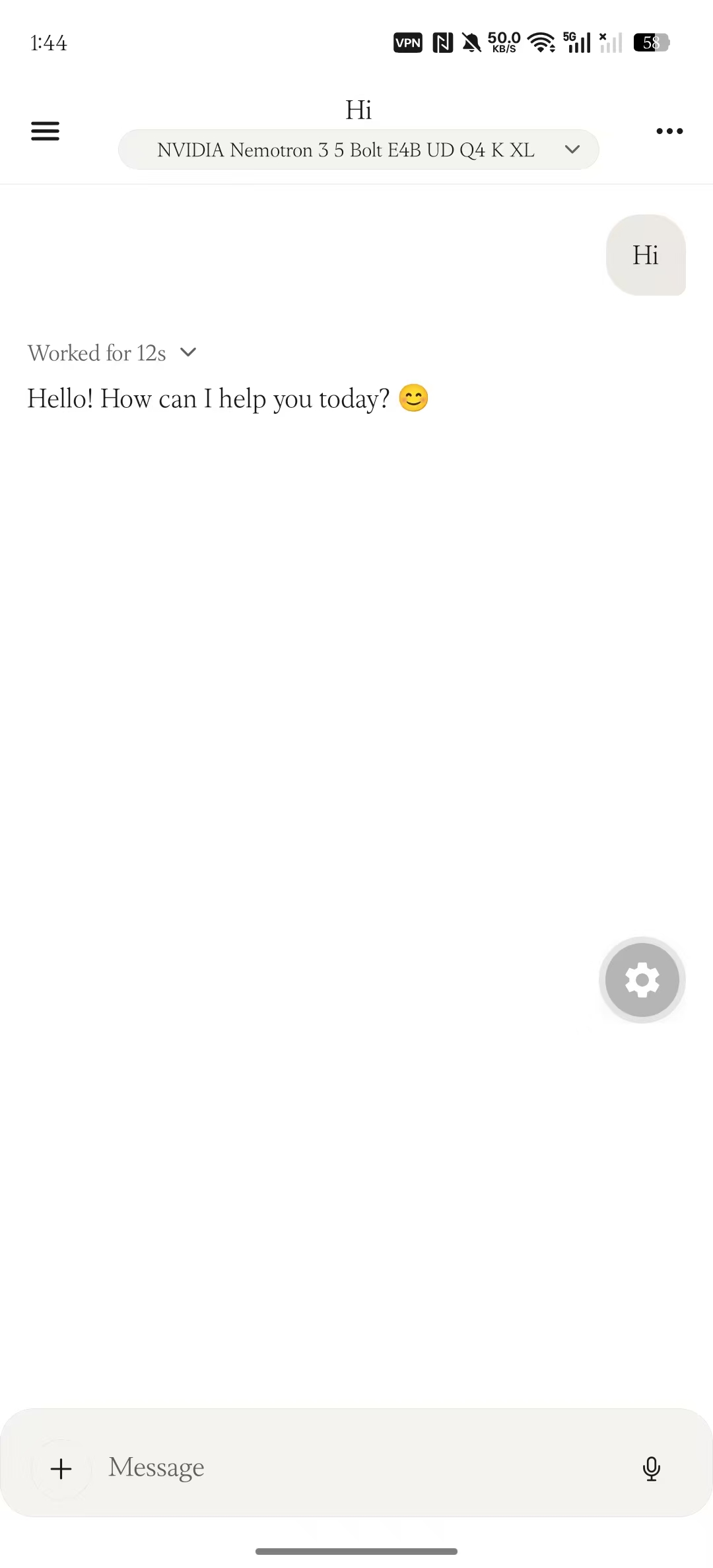
Relay Mobile is an Android companion, not a second workspace. The desktop owns the models, keys and files; the phone pairs over a QR code or Tailscale and talks to the relay with an end-to-end encrypted connection.
- Pairing: QR or Tailscale, with a nonce-bound proof, a replay guard and a strict-pairing option. Prefer the wss HTTPS serve URL; release Android rejects cleartext.
- Chat: sessions, streaming, queued sends with Send now, stop, undo checkpoints, colorized diff sheets, turn changes and read-aloud.
- Approvals & bots: answer bot approvals, see the roster, and get notifications for runs and questions.
- Settings: app lock, notifications, cost/usage, TTS voice/speed and connection state.
- Keys: stay on the desktop. The phone receives chat and artifact data, never provider credentials.
Settings & customization
Settings is the control panel for the whole workspace, grouped by intent rather than by backend module.
- Appearance: light, dark or system, seven curated themes, wallpaper and dim, custom sidebar art, fonts and companion pet settings.
- Notifications: DND, sound, OS toasts and the notification center.
- Composer: send behavior, predictions and the prediction model.
- Assistant & improvements: global prompt, skills, self-improving artifacts.
- Models & providers: API keys, web search, local models, compaction, harnesses, subagents, Session Mesh.
- Workspace: git, approval rules, hooks, connectors, MCP servers, knowledge, wiki, memory, remote and data.
Privacy & data
Relay is local-first, not offline-only. Your workspace, chats, notes, memory and artifacts live on your machine; cloud providers and connected services receive whatever you send them. There is no Relay-side account and no telemetry.
- Data: a local SQLite database, your chosen folders, app-managed artifacts and backups. Expired artifacts are archived before deletion.
- Keys: provider keys and OAuth credentials live in the OS keychain.
- Files: file tools stay inside granted roots; exec and tool calls respect the permission posture and hooks.
- Release: the source repo stays private; the public releases repo carries installers, the Android APK and the signed update feed. Relay is proprietary software; installers are free to download.
Troubleshooting
- Installer: Windows SmartScreen may warn on a build without Authenticode. Only continue if the file came from the official releases repo.
- Local models: performance and fit depend on RAM/VRAM and quant; use the model card and the local request log to check TTFT and context.
- Phone pairing: prefer Tailscale's HTTPS serve URL. If a QR points at a dead port, check the serve port in Settings → Remote.
- Updates: the banner reads the signed feed. If it is quiet, check the Releases page and the app version in Settings.
- Recovery: the Local Models Logs view, the notification center and the audit/approval ledgers are the first places to look for what a turn actually did.
Mod+K command palette · Mod+/ every shortcut · Esc stops a turn or closes a popup · Tab accepts a composer prediction · ↑/↓ walks sent prompts · Ctrl+W closes the focused pane.
Still curious? The release notes have the version-by-version detail, and the FAQ covers the common questions.